



















Table of Contents
- • SavvyCal Review Summary
- • About SavvyCal
- • Other opinions about SavvyCal
- • SavvyCal Overview
- • SavvyCal Review
- • SavvyCal Basic Review
- • SavvyCal Premium Review
- • SavvyCal Pros & Cons
- • SavvyCal Return Policy
- • SavvyCal Digital Delivery and Access
- • SavvyCal Contact Information
- • Where to buy SavvyCal?
- • Conclusion of SavvyCal reviews & ratings
SavvyCal Review Summary
SavvyCal is a scheduling software designed to streamline appointment booking by overlaying calendars and providing flexible controls for managing availability. It generally serves professionals and small to mid-size teams needing customizable, team-oriented scheduling solutions. The platform tends to deliver a polished user experience with reliable performance, though some users may find its pricing and lack of a mobile app limiting.
Highlights
- Suitable for professionals and small to mid-size teams
- Supports individual and team scheduling with multiple modes
- Premium pricing and no standalone mobile app are notable limitations
- Overall solid scheduling tool, rated 4.8/5 for usability and features
Within the broader scheduling software category, alternatives exist that provide different pricing structures or automation features. This summary provides perspective for those considering SavvyCal without promotional bias. More details can be found in the SavvyCal review.
About SavvyCal
Scheduling meetings often involves tedious back-and-forth emails and difficulty finding mutually available times. This inefficiency can lead to wasted time and disrupted workflows, impacting productivity. Many users struggle to coordinate calendars transparently and prioritize preferred meeting slots.
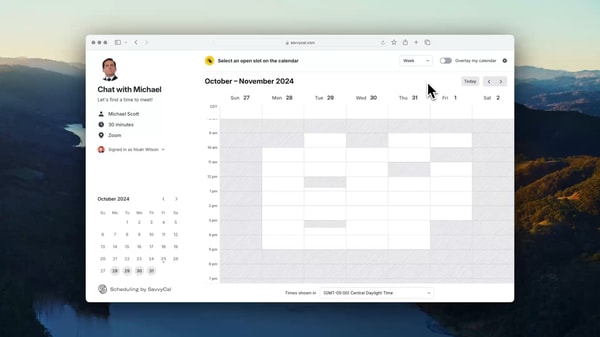
SavvyCal is a scheduling software designed to simplify appointment booking through calendar overlays and flexible controls. It operates as a web application with a Chrome extension and serves professionals and teams seeking smarter scheduling solutions. SavvyCal positions itself as a premium alternative to traditional tools with strong customization and team scheduling modes.
With over 2,000 customers and a 4.8 rating from verified reviews, SavvyCal has gained recognition for its user-friendly interface and effective scheduling features. Users value its calendar overlay and responsive support, contributing to steady adoption globally. The platform supports team coordination and individual scheduling with practical usability strengths.
This tool fits professionals and small to midsize teams needing intuitive scheduling with branding options. However, it lacks a standalone mobile app and comes at a higher price point, which may limit appeal for some users. For a full assessment of features and trade-offs, see our SavvyCal review.
Other opinions about SavvyCal
Opinions and insights gathered from trusted review articles and authoritative websites covering SavvyCal.
SavvyCal Overview
SavvyCal is a scheduling software tool designed to simplify appointment booking by providing calendar overlays and flexible controls for availability management. It operates as a web application complemented by a Chrome extension, focusing on professional and team scheduling globally. The platform is subscription-based and is sold directly through its official website.
Founded by Ingrid Ødegaard and Anvisha Pai, SavvyCal serves primarily professionals and small to mid-size teams seeking customizable scheduling solutions. Its feature set includes meeting polls, ranked availability, and team scheduling modes such as collective, round robin, and group. The platform supports customization options like branding and custom domain hosting to enhance the user experience.
SavvyCal’s operational approach emphasizes usability through a modern interface with responsive customer support and reliable performance. While the product does not currently have a standalone mobile app, it enables users to coordinate meetings efficiently via the web. This SavvyCal Review reflects its role as a premium scheduling tool balancing advanced features with certain platform limitations.
SavvyCal Review
SavvyCal is a scheduling software brand focused on providing flexible and customizable solutions for professionals and small to mid-size teams. It specializes in simplifying calendar coordination through intuitive features that enhance meeting scheduling efficiency. The brand emphasizes modern design and user-friendly tools to reduce scheduling conflicts and save time. SavvyCal caters to users seeking advanced functionality in a web-based platform.
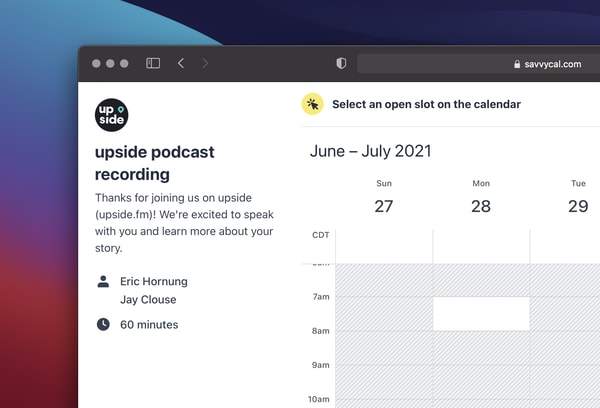
The brand offers a scheduling platform featuring calendar overlays that display mutual availability between users and recipients. It supports various team scheduling modes including collective, round robin, and group options. Custom branding and domain hosting add a professional touch to scheduling links. SavvyCal positions itself as a premium alternative for professional scheduling needs, emphasizing usability and customization.
SavvyCal Highlights- Intuitive modern interface
- Calendar overlay feature
- Multiple team scheduling modes
- Brand customization options
- Responsive customer support
SavvyCal Basic Review
SavvyCal Basic provides a scheduling tool designed for individuals and teams to organize meetings efficiently. Its calendar overlay feature allows recipients to see the sender’s availability, reducing back-and-forth communication. The interface is modern and user-friendly, with options for branding customization including colors, avatars, and banners.

The platform supports team scheduling through collective, round robin, and group modes, suitable for various collaborative settings. It integrates with major calendar services such as Google, Outlook, and iCloud, and supports tools like Zoom. Accessibility is through a web-based service and a Chrome extension, with no standalone mobile app available.
While the pricing is higher than some competitors, users appreciate the polished experience and responsive customer support. The tool offers flexibility in managing meeting loads and prioritizing focus time, making it practical for professionals with busy schedules.
Price $12 • savvycal.com
SavvyCal Premium Review
SavvyCal is a scheduling tool that simplifies meeting coordination by overlaying user calendars with invitees to find mutual availability. The platform offers a modern and intuitive interface with flexible controls such as ranked availability, time blocking, and buffers to optimize scheduling and protect focus time.
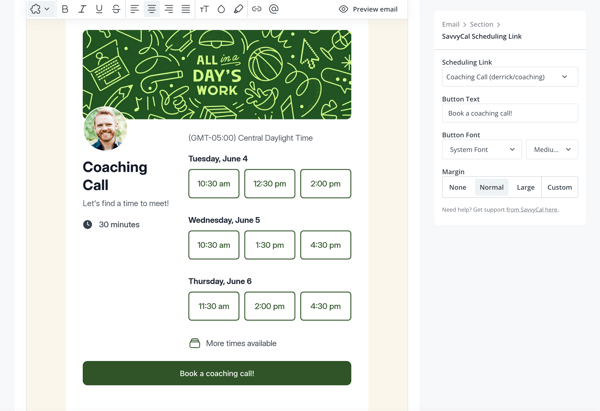
The software supports various team scheduling modes including collective, round robin, and group scheduling, which suits businesses looking to streamline appointments. High customization options, including branding with colors, avatars, and custom domains, enhance user experience, along with a Chrome extension for added accessibility.
Users generally praise SavvyCal for its user-friendly design and responsive customer support. However, it lacks a standalone mobile app and pricing may be considered relatively high. The service provides a 30-day money-back guarantee and several tiered plans to accommodate different user needs.
Price $20 • savvycal.com
SavvyCal Pros & Cons
SavvyCal provides a user-friendly interface with an advanced calendar overlay feature that simplifies finding mutual availability. It supports multiple team scheduling modes and offers strong customization and professional branding options, making it suitable for various scheduling needs. The platform operates globally via its web application and Chrome extension, delivering reliable performance with responsive customer support.
However, SavvyCal does not offer a free tier, which can limit access for individual users or those with tight budgets. Its pricing is relatively high, especially for solo professionals, and the absence of a dedicated standalone mobile application may restrict flexibility for users who prefer native mobile access. These limitations should be considered when evaluating its suitability.
- • User-friendly interface
- • Advanced calendar overlay feature
- • Multiple team scheduling modes
- • Strong customization options
- • Professional branding support
- • Responsive customer support
- • Global web and Chrome extension access
- • Reliable platform performance
- • No free tier available
- • Relatively high pricing
- • No standalone mobile application
SavvyCal Return Policy
SavvyCal offers a 30-day money-back guarantee for subscriptions purchased on the official website. There are no fees for refunds requested within this 30-day period. Refund eligibility is limited to subscriptions bought directly through the official site.
Refunds are not available for purchases made outside the official website or beyond the 30-day window. There are no specified refund policies for other channels or extended time periods. Customers should ensure they purchase through the official website to qualify for the refund guarantee.
SavvyCal Digital Delivery and Access
SavvyCal is delivered digitally through a web application and a Chrome extension, enabling global access via the internet. There are no physical products or offline sales channels associated with this service. The platform requires an internet connection to function and is accessible from supported browsers.
Subscription activation provides immediate access to the service without shipping delays. There are no tracking or shipping costs because the delivery is fully digital. Users log in through the official website to manage their account and access scheduling features directly online.
SavvyCal Contact Information
Users can reach SavvyCal customer support primarily through the official website contact form. There is no public direct email or phone number available for support inquiries. Support covers topics like setup assistance, scheduling issues, billing, and account management.
- Contact form: https://savvycal.com/contact
- Support page: https://savvycal.com/support
Support is responsive based on user reports, though live chat and social media options are not offered. Customers are encouraged to use the available channels for assistance with any issues or questions.
Where to buy SavvyCal?
Users can officially purchase SavvyCal through its website, where features such as account management, direct support access, and clearly stated policies ensure a structured buying process. Purchasing via savvycal.com offers consistency and transparency that third-party marketplaces may lack, including unified subscription handling and refund options. While no offline stores currently sell SavvyCal, this online-only distribution means users should consider the limitations that come with web-exclusive access and pricing compared to other platforms.
Conclusion of SavvyCal reviews & ratings
Scheduling tools that offer clear visibility and flexibility matter greatly for productivity, and SavvyCal stands out with its calendar overlay and customizable team scheduling. Its modern, intuitive design helps simplify complex coordination, making it a noteworthy option in this space as seen on savvycal.com. The platform also balances usability with professional branding features, lending itself well to teams and individuals looking for an efficient way to manage meetings.
Exploring options thoughtfully can help find the right fit, and readers can refer back to the SavvyCal Review for a detailed perspective on features and considerations. This review supports informed decisions without assumptions, encouraging a measured approach to evaluating scheduling software.
Editorial notes reflect aggregated buyer feedback and our independent editorial review of publicly available information. They are for informational purposes only and do not constitute endorsements. Purchases are made at your own discretion, and we are not responsible for transactions or outcomes related to this store. Experiences may vary. This content is assisted by AI and reviewed by our editorial team. While we strive for accuracy, AI-supported information may not always be 100% precise, so please verify any critical details.

